
How do I set up a Redirect via Direct Admin?
You have now successfully set up a site redirect!
Here’s a brief guide on how to create a redirect using Direct Admin.
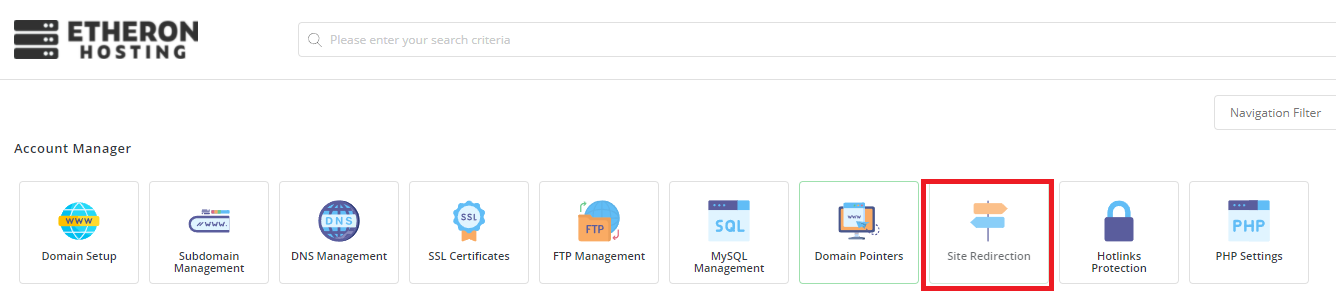
- Go to your Direct Admin dashboard and click on "Site Redirection."
- Click on "Create New Redirect."

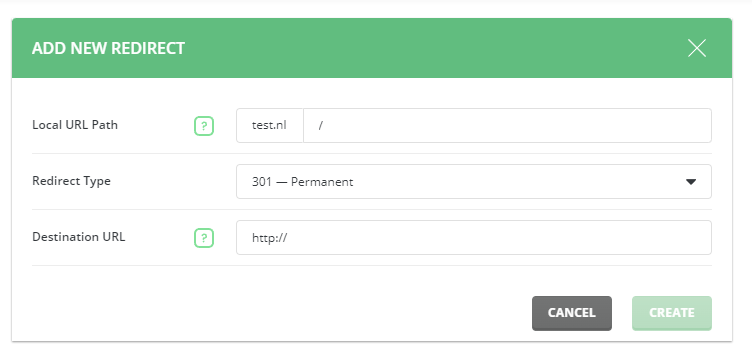
- Choose whether you want to redirect the entire domain or a specific file path, then enter the destination and click on "Create."
Note: If you only want to redirect the domain itself, just enter a "/" in the "Local URL Path" field.
You have now successfully set up a site redirect!
If you encounter any issues, feel free to reach out via Discord or create a support ticket through this link.
Lars
Updated on: 09/09/2026
Was this article helpful?